 |
welcome, guest |
| Help Forum | ||||
 |
| |||
 Jessica    |
This issue has been bugging me for some time, and when I looked into it the other day, it seemed to be fixed. Alas, not quite! Basically, in some of my C3/DS worlds (particularly newly created ones) pressing Shift+Ctrl+W to reach the wolfing run controls does absolutely nothing. This also means that autokill can not be enabled or disabled. However, now that I think of it, I believe autokill was disabled in the new worlds I created. Could that be the cause? I'm just curious whether anyone has had a similar experience, or has any ideas of how to fix this. I've been getting some of the annoying errors that normally would be taken care of in the background with autokill. Any help is greatly appreciated! I'd be happy to share more information... I'm just not sure what information would be most useful in figuring this out! |
|||
 Malkin Manager |
In my version of DS (Kutoka's), Autokill is independent of the Wolfling Monitor - I just use Ctrl Shift A to turn it on or off. I can't remember if this is different from the other versions or not.  My TCR Norns |
|||
Jessica |
I don't think this is how mine works, although I've tried every key combination. I can always open up the CAOS command with Shift+Ctrl+C, but the wolfing controls aren't very reliable. I have to go to an older world to turn on autokill, quit to the main menu, and then open up another world. I don't use the wolfing controls that much, but it baffles me why they're not working! I'm going to be testing out a few more things to see if I can work it out. Strange, indeed! |
|||
 Marvolo323 |
I believe autokill can be turned on and off at launch time by removing and/or adding the command-line parameter "--autokill" to whatever is launching DS. Why not make two shortcuts, one with and the other without? |
|||
Jessica |
Thanks for the tip, Marvolo323! I'll try that out, since autokill is the main option I'm after. I still can't figure out this wonderful wolfing control mystery, but it's not the end of the world. So long as autokill works, I'm a happy camper! Thanks again! |
|||
Jessica |
Call me blind and dumb, but how exactly would I use the "--autokill" command line parameter? If it helps any, I load Docking Station from the following: "C: \Program Files\GOG.com\Creatures Exodus\Docking Station\engine.exe" Sorry about the double post... I love how this sounds so simple (and probably is) but just doesn't want to work correctly in my mind. Ha ha! Thanks! |
|||
 Tea Queen Laura |
(No worries, Jessica. We've relaxed the rules on double posting; you've added new information to alert others, and to help them help you solve your problem, so your double post is justified).  |
|||
 idleRAT |
This may be a little late, but if you're still wondering how to make a shortcut that will load the game with autokill enabled at start-up: In your Docking Station folder, right click the engine.exe file and create a new shortcut. Drag the shortcut to your desktop(or wherever you want it), right click it, choose properties and add --autokill to the end of the target line. It should look like: 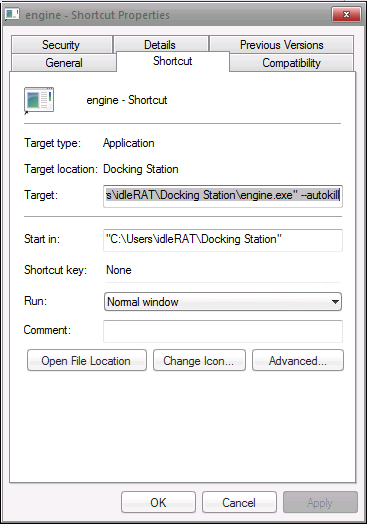 Only it'll link to your file instead of mine ^^ Note the space between " and the --autokill , it needs to be there. Hit apply and okay and every time you launch the game via that shortcut, autokill will be enabled. If you want to change it back, just remove the space and the --autokill, hit apply and ok and it'll be back to normal. You can actually use this method to fix the launch shortcut in the start menu as well if you want(stops it from launching install blast every time instead of the game). Just right click it, choose properties and change the target to engine.exe instead of Installblast.exe and it should go straight to the game(add the --autokill there too if you want it to have autokill enabled when launched through the start menu). Bored? Here are some Nornish suggestions: "Maybe get creature egg, [name]" "Maybe push Grendel, [name]" |
|||
| downloads cobs adoptions creaturelink metarooms breeds gallery art wallpaper screenshots graphics promos sprites |
dev hack shack script reservations dev resources active projects dev forum community links advice chat polls resources |
creatchi forum bookmarks general news help development strangeo survivor |
mycaves log in register lost pw |
0 online |
| creatures caves is your #1 resource for the creatures artificial life game series: creatures, creatures 2, creatures 3, docking station, and the upcoming creatures family. contact help privacy policy terms & conditions rules donate wiki |
||||