 |
welcome, guest |
| Help Forum | ||||
 |
| |||
 Melody   |
C2 Sweet World Error I opened up my Sweet World in Creatures 2 only to get this error. Can anyone help me please?  |
|||
Melody |
I use the GoG version of the Albian years. I do have the remastered patch. Also, the error is shown in the link I provided. (The image was too big to post here and stretched the page.) Thanks in advance.  |
|||
Melody |
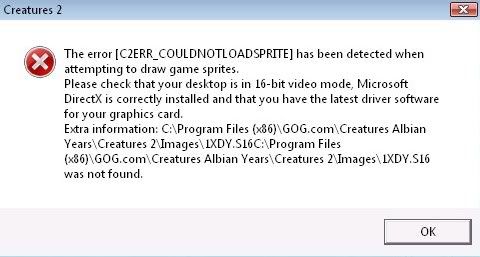 I post the link in my first post, do you mean it won't let you see it? Anyway, I'll just put it here. Yes, my other worlds work. Sorry about the big image. |
|||
Melody |
The Good Old Games version of Creatures 2 is designed so that it can run on Vista. Maybe Sweet World isn't compatible with the Good Old Games version of Creatures 2? Sweet World was working fine until yesterday. Anyway, I'll just uninstall and reinstall the game... because I feel like it. |
|||
 Norngirl  |
I think I know that problem,melody. I noticed when downloading worlds - wich appear to have creatures in it,then suddenly crash and you try to load - it doesn't like that. it say it's missing a creature that is of moniker 1XDY. I can see it ask for a moniker image. you may remember when looking at creatures DNA,theyre moniker have name such as 3DAN or 5WSU etc Simply - my solution to this was to go to image folder - take a sprite file moniker (any kind) as long it look like that and copy it outside on desktop - rename it to 1XDY and then paste it back. This will make the current creature look probably funny,as it's not the right sprites - but this let you get ingame and export it. should it be more then one moniker that is problematic,just do the same til you are able to go ingame - export the creatures,save and hopefuly you be able to play. Edit: also - if you want to be able to see your'e creature again with those moniker back to it's right look, simply delete the new moniker sprite you gave them temporary (be sure you exported them first before doing this) and then start the game - import them again, that should make them create theyre true moniker spritefile... For me - this is a constant problem when using worlds like that, and it seem it is a Albian year prob (and as well gog,as it's based on it) they seem to not like third party worlds as they may work fior a while then they crash and give this silly message >_> Made me stop using the worlds ^^' But hopefuly it maybe help you :3 |
|||
 AquaShee |
Norngirl is right though, if the sprite file cannot be found, then replacing it with a similar one will mot likely solve the issue. The Community Scribble: make (y)our own metaroom! |
|||
Melody |
Yeah, it was running perfectly with all my Kai and Uni Norns until last night. I think I might have been injecting a COB when it happened. Dx Anyway, I just uninstalled and reinstalled Creatures 2 so case closed, unless the problem comes up again. |
|||
| downloads cobs adoptions creaturelink metarooms breeds gallery art wallpaper screenshots graphics promos sprites |
dev hack shack script reservations dev resources active projects dev forum community links advice chat polls resources |
creatchi forum bookmarks general news help development strangeo survivor |
mycaves log in register lost pw |
0 online |
| creatures caves is your #1 resource for the creatures artificial life game series: creatures, creatures 2, creatures 3, docking station, and the upcoming creatures family. contact help privacy policy terms & conditions rules donate wiki |
||||